
It’s great you can share a SharePoint site and/or specific folders or files in a library, however, be careful how much flexibility you allow. You can configure global sharing settings in the SharePoint Admin section as well as configuring specific sites for unique sharing settings. If you don’t have IT staff to manage this then losing visibility of what is shared with who could be a liability.
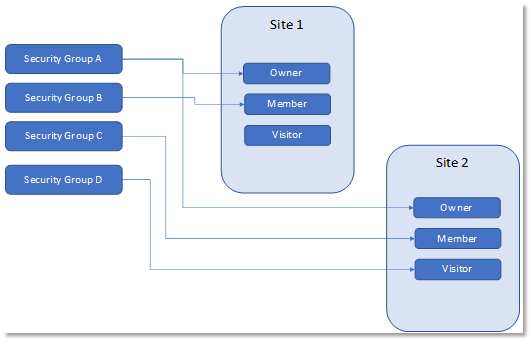
I like simple. If you have a typical scenario where you have some content that is shared by all people in your organization and some content that is restricted (eg HR, financial, etc.) then I prefer to use a traditional site collection architecture with non-365 group sites, keep the Owner, Member, Visitor groups (and for God’s sake do not remove these default groups under no circumstances or a plague of Locusts will befall you – seriously, things get really messy if you do) and then define the needed 365 security groups. Next map the 365 security groups to the appropriate default SharePoint site groups and finally add and remove users from those 365 security groups only. Tell your users not to share files and under global sharing settings be as restrictive as possible.
The following illustration shows an example mapping between 365 security groups and SharePoint groups.
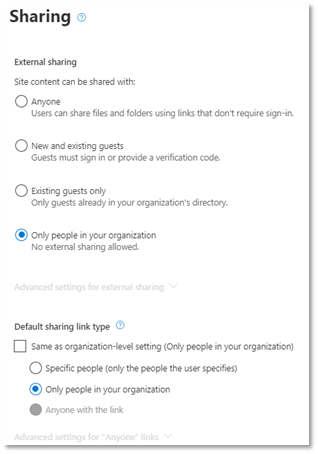
For each site collection you may want to restrict sharing like the following illustration.
Cheers.
 Stratacollab Consulting