
I recently came across this issue with a client where they were unable to delete a folder with subfolders or files in it. If they did try they receive this error message:
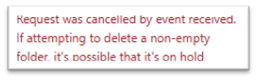
After some digging, I found that some policies were set that can cause this behaviour. Under Compliance.microsoft.com you will find Data lifecycle management on the left navigation. Choose Microsoft 365 under that menu item and then on the Data lifecycle management page select Retention policies, if you find policies and there is no good reason to keep them, then remove them. This should fix the ‘cannot delete a folder’ issue.
 Stratacollab Consulting